Since September, PathDay has lived on iPhone, iPad and Apple Watch. Today it is on the Mac as well, and the same update brings something I have wanted in it from the start: a journal.
The Mac app is free, like the rest of PathDay, and it is on the same App Store page you already know. If you use PathDay on your phone, open it on your Mac and your day is already there.
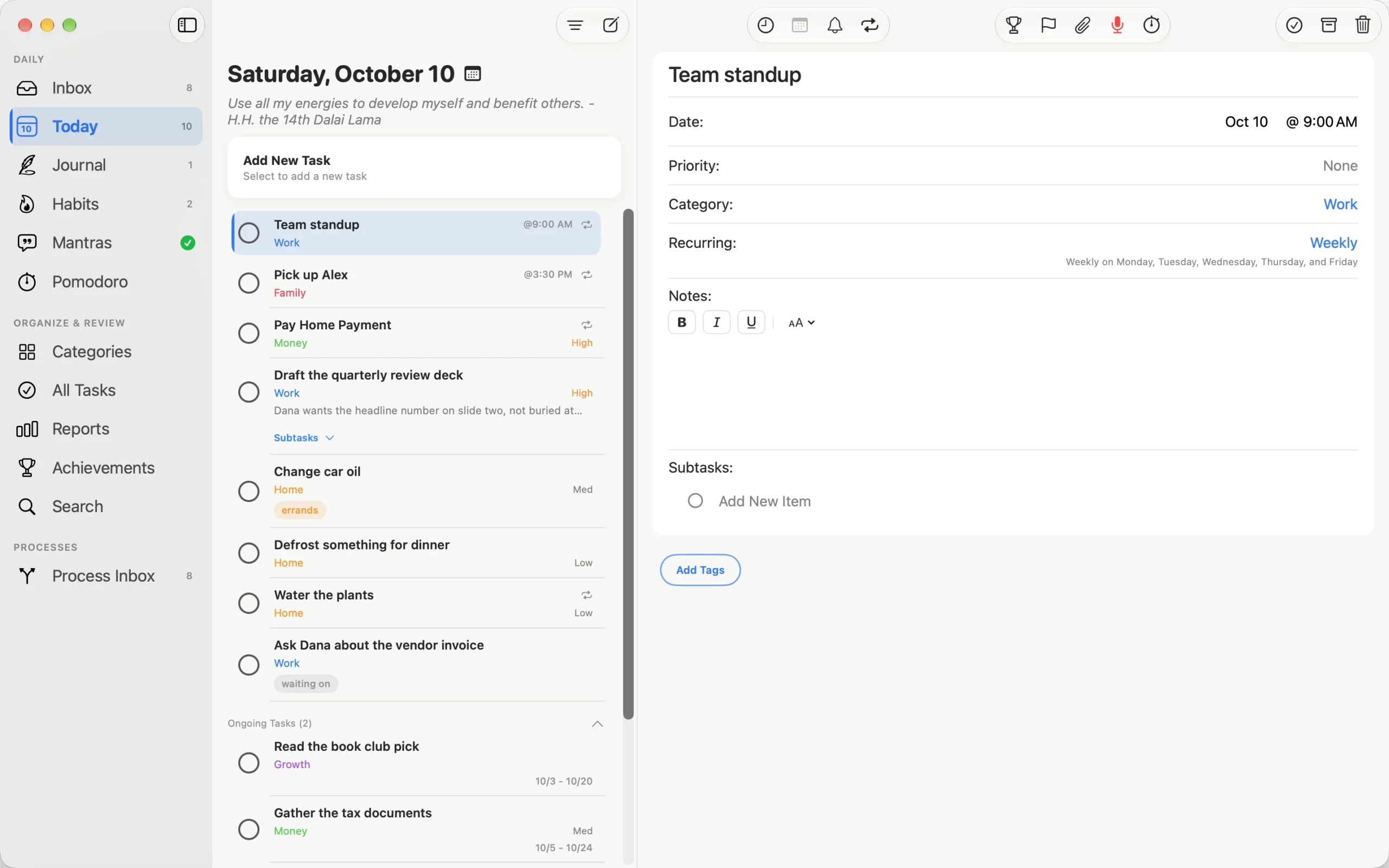
Built for the Mac
The easy way to put an app on the Mac is to stretch the iPad version until it fills the window. I did not want that, because the Mac is where I sit down to plan, and planning wants a keyboard, a pointer and room to see more than one thing.
So the Mac version has a sidebar down the left, your list in the middle, and the task you are working on open beside it. You never lose your place to open something.
A few things only make sense on a Mac:
- Add tasks one after another. Type a task, press Return, and the next blank task is waiting with the cursor in it. Press Esc when you are done.
- Pick a date in one click. The date picker leads with Today, Tomorrow, This Weekend and Next Week, with the full month underneath.
- Right-click a task to flag it, unflag it or delete it, and delete a whole repeating series from the same menu.
- No Save button. Changes save as you make them. If you change your mind, Roll Back puts the task back the way it was.
- Widgets on the desktop. Today, Habits and Mantras sit on your desktop the same way they sit on your Home Screen.
- A floating focus timer that stays on top of your other windows while you work.
Settings opens in its own window from PathDay > Settings, or Command-comma, like any other Mac app.
Everything else comes with it
The Mac app is not a cut-down companion. Today, Inbox, Process Inbox, Habits, Mantras, Quadrants, Pomodoro, Reports and Achievements are all there, and they stay in sync with your iPhone, iPad and Apple Watch through your own iCloud. Finish a task on your watch at the gym and it is ticked off on your Mac by the time you sit down.
The Journal
The Journal is new on every device, and it is the part of this update I use most.
Each day gets its own page. You can keep one entry a day, or split it into a morning check-in and an evening reflection. Write in rich text with lists, checklists and photos, or tap the record button and talk, and PathDay will turn it into text if you want it to.
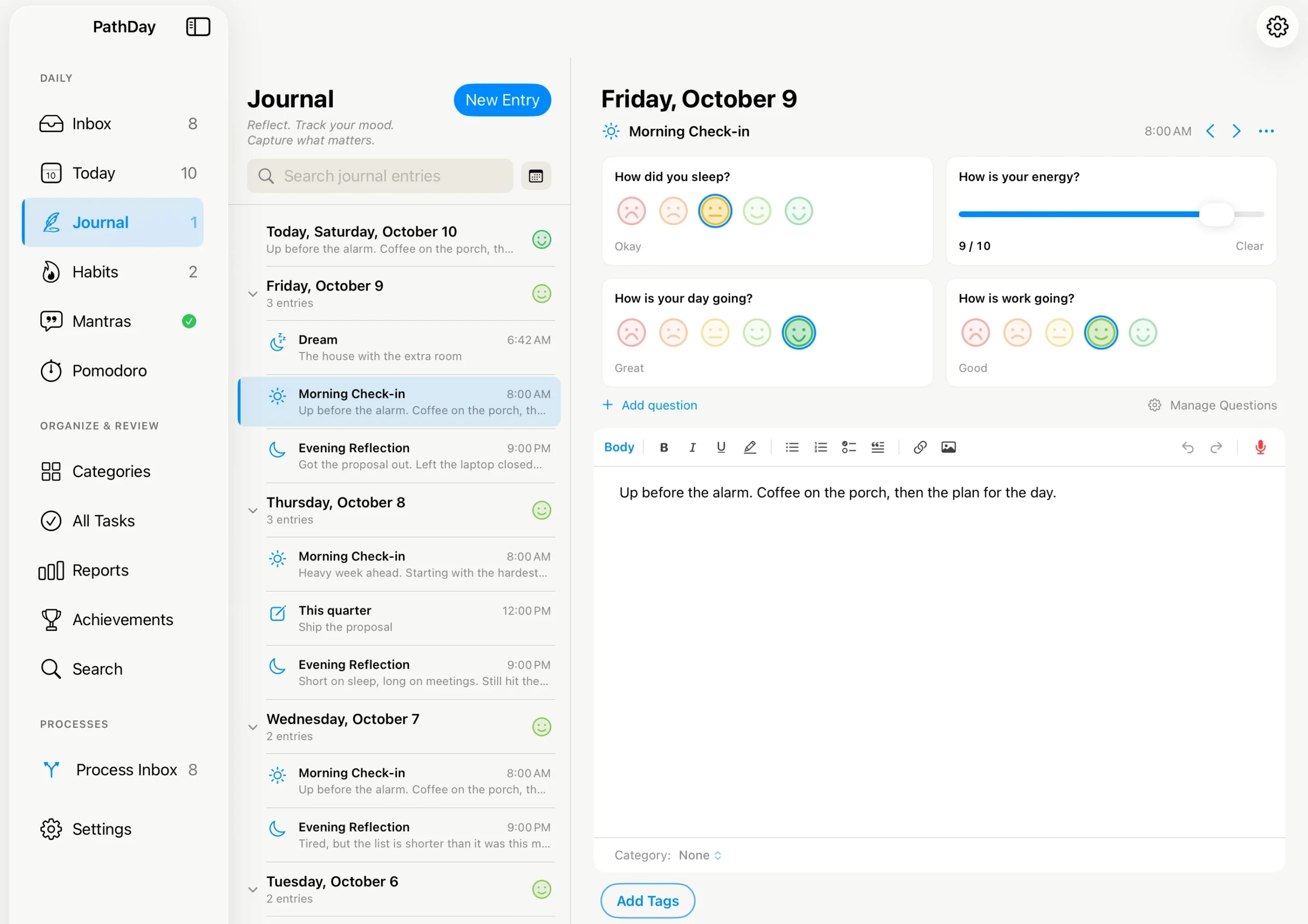
Check-in questions are yours to write. “How did you sleep?” can be answered with a face, “How is your energy?” with a number from 1 to 10, and a question can show only on the days you choose, so “How is work going?” stays off your weekends.
Entries take categories and #hashtags, the same ones your tasks use, so a project can hold both the work and what you thought about it. A calendar and search let you find any day again. There is more on how it works in A journal that lives with your day.
If you remember your dreams, there is an optional Dream Journal as well. It is off until you turn it on in Journal Settings.
Smaller things in this update
On iPhone and iPad, a few things changed along the way:
- The task editor leads with the task’s name as a large heading, and notes grow as you type.
- Quick entry stays open after you add a task, so you can add several in a row.
- Web addresses, phone numbers and street addresses in notes and journal entries become links.
- If your iCloud storage fills up, PathDay tells you, and Settings > Manage Data > Storage shows what is taking the space so you can clear it.
- PathDay is no longer closed by iOS while it is syncing with iCloud.
What it is not
As always, it is worth being clear about the edges.
Apple Health is not on the Mac, so habits that read steps, sleep or workouts from Apple Health keep doing that on your iPhone and iPad. Their logs still sync to the Mac; the Health connection itself stays on the device that has Health.
Alternative icon colors are an iPhone and iPad feature. On the Mac, PathDay uses its standard icon.
And the Journal is a journal, not a mood-tracking service. Your entries and your answers stay in your own iCloud, are not Apple Health data, and are never read or shared by anyone else.
Get it
PathDay is free on iPhone, iPad, Apple Watch and Mac, with every feature included. On the Mac, open the App Store and search for PathDay, or get it on the App Store.
PathDay is on iPhone, iPad, Apple Watch and Mac. Free.