A task list tells you what you did. It never tells you how the day went.
That gap has bothered me since the first version of this app. I kept a paper daily page for years: the tasks on one side, and on the other a few lines about how I slept, what I was grateful for, and what I wanted to remember. The tasks moved into PathDay a long time ago. The other side of the page never did, until now.
PathDay 2026.4.1 brings the Journal to iPhone, iPad and Mac. It sits with the rest of your day, so the place you plan is also the place you look back.
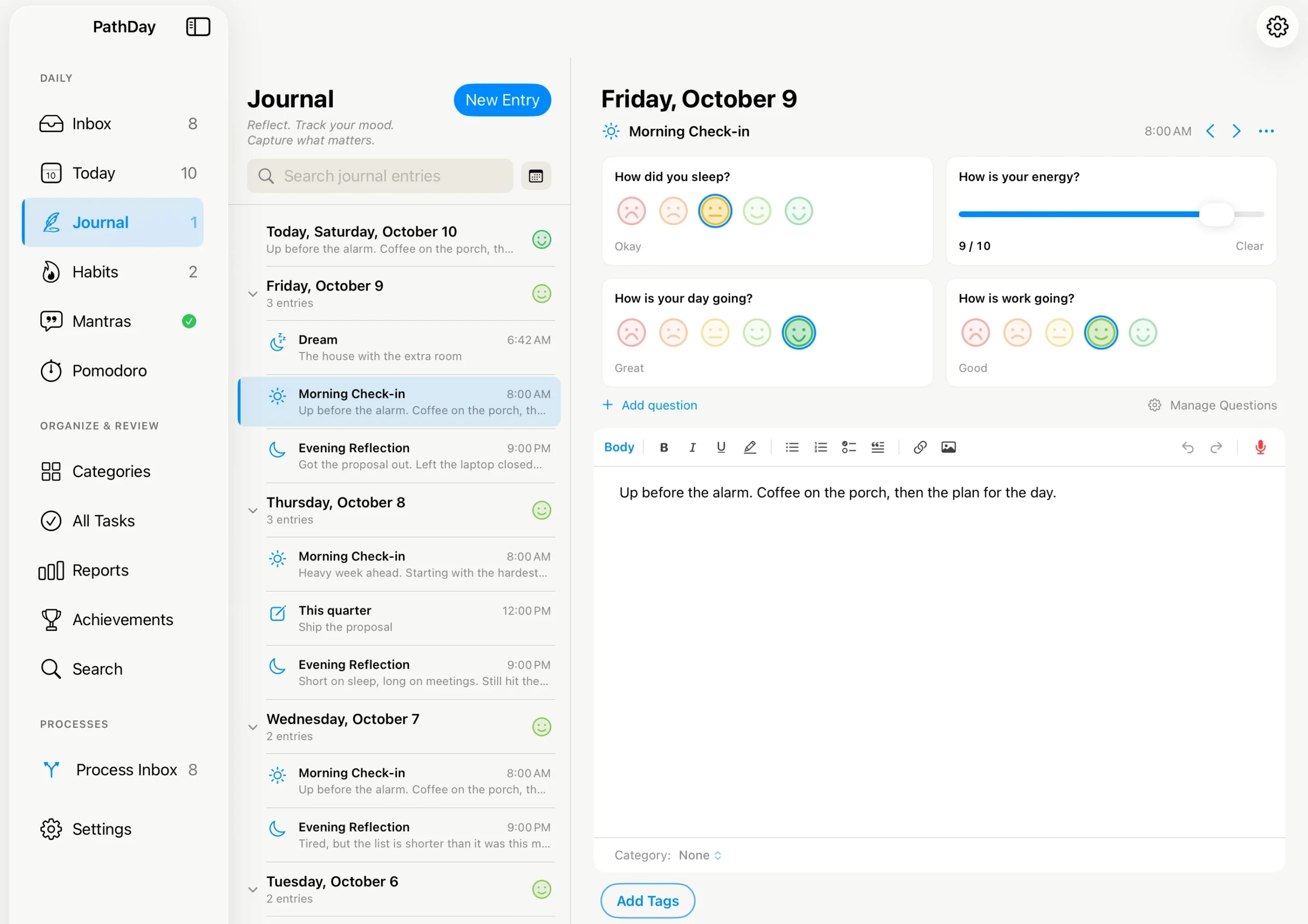
A page for every day
Open Journal and today is always at the top, even before you have written anything, so there is always somewhere to start. Below it, every day you have written in, newest first. Days you skipped are not listed. A journal should not greet you with a row of blanks.
Writing is real writing. Headings, bold and italic, bulleted and numbered lists, checklists, quotes and photos all sit in the entry itself. There is no Save button. Close the entry and it is kept; leave it empty and it quietly goes away.
The day also starts when your day starts. A reflection written at 1 AM belongs to the day you just lived, not the one that began an hour ago, so the Journal treats 3 AM as the turn of the day. You can change that in Journal Settings.
Once a day, or a few check-ins
When you first open Journal, it asks one question: how would you like to journal?
- Once Daily: one entry a day. This is where it starts.
- Morning and Evening: a Morning Check-in and an Evening Reflection.
- Morning, Afternoon, and Evening: three check-ins.
- Custom: name your own, like Before Work or Before Bed, each with its own time and icon.
You can change your mind at any time, and changing the schedule never deletes an entry. With check-ins on, Journal shows how many of today’s are still unwritten, the same quiet count you see beside Inbox. With Once Daily there is no count at all.
Questions you write yourself
You can add questions to each journal entry to help you reflect on your day. These questions appear above the area where you write.
There are two ways to answer questions:
- Five faces: Choose from Very Bad to Great for questions like “How did you sleep?”
- 1 to 10 scale: Choose a number for questions like “How is your energy?”
PathDay includes a few suggested questions to help you get started. You can also create your own, edit existing questions, or turn them off.
You can choose which check-ins show each question. You can also choose which days of the week a question appears. For example, you might want “How is work going?” to appear only on weekdays.
All questions are optional. You can skip them and go straight to writing. If you change or delete a question later, your past answers are not changed.
Talk instead of type
You do not always have to type your journal entries. Sometimes it is easier to talk about your day.
Tap the record button to record your thoughts. You can keep the recording with your entry or have PathDay turn it into text.
Once the recording becomes text, you can edit it just like anything else you write in your Journal.
Part of the same system
One of the most important parts of the Journal is how it works with the rest of PathDay. It is not a separate app. It is part of the same system you already use to manage your tasks and projects.
Journal entries use the same categories and #hashtags as your tasks. You can type a #hashtag anywhere in your writing, and PathDay will recognize it. You can also set a default category and hashtags for new entries in Journal Settings.
This means you can keep your tasks, projects, and thoughts organized using the same categories and hashtags.
The Journal also includes a calendar that shows which days you have written. You can select a past day to read an entry or add one you missed.
There is also a search feature to help you find past entries based on what you wrote.
The Dream Journal
PathDay also includes an optional Dream Journal for anyone who wants to record their dreams.
The Dream Journal is turned off by default. You can turn it on in Journal Settings.
Dream entries have their own questions, separate from your daily journal questions. For example, you can answer “How vivid was the dream?” or “How much do you remember?”
This keeps your dream entries and questions separate from your daily check-ins.
What it is not
There are a few things worth knowing about the Journal.
The Journal is not available on Apple Watch. Writing and reviewing journal entries works better on iPhone, iPad, and Mac.
Journal entries do not appear in PathDay’s main Search screen. Since journal entries can be personal, they have their own search within the Journal.
The Journal is also not a mood-tracking service. It is a place to write about your day and reflect on your experiences.
Your journal entries and answers are stored in your own iCloud account. They sync between your devices, just like the rest of your PathDay data. They are also included when you export your data.
Your entries are private and are not read or shared with anyone else. Journal entries and answers are not stored as Apple Health data.
Get it
The Journal is included in PathDay 2026.4.1 for iPhone, iPad, and Mac. It is free, with all features included.
If you already use PathDay, just update to the latest version. If you are new to PathDay, you can get it on the App Store.
PathDay is available on iPhone, iPad, Apple Watch, and Mac. Free.