Everything PathDay can do
Every feature is free and stays free. Scan the practice you care about and find the tools that fit how you work.
Capture everything, plan today with confidence
Organize all you need to do, then work from one clear Today view.
Unlimited tasks and subtasks
Capture everything, then break big tasks into checklists of smaller steps.
Today-focused planning
One clear view of what needs attention now, with overdue and upcoming still visible.
Categories for every area of life
Each category has a name, icon, and color, and tasks are filed into exactly one of them, or none at all.
Inline #hashtag tags
Type a #hashtag in a task name and filter by tag everywhere in the app.
Color-coded priorities
None, Low, Medium, High, or Critical, visible at a glance in every list.
Quick bulk editing
Select multiple tasks and set Date, Category, or Priority for all of them at once.
Recurring and flexible scheduling
Daily, Weekly, Monthly, or Yearly patterns, with single-occurrence or whole-series edits.
Reminders and notifications
Up to two reminders per task, using presets or a custom date and time.
Attachments and audio memos
Attach photos and files, and record audio memos, with optional transcription into the notes.
Links in notes
Web addresses, phone numbers, and street addresses in notes become links you can tap.
Add several in a row
Quick entry stays open after you save, so you can add one task after another.
Capture now, decide later
The Inbox gives every stray thought a place to land in one tap, then Process Inbox clears it in one deliberate pass.
Capture without deciding
An Inbox item arrives with no date and no category, so capturing costs you nothing and interrupts nothing.
Process the whole queue
Your inbox sits on one screen with a progress strip counting down. Tick one item or several, then choose Schedule, Snooze, or Update.
Schedule in a tap
Today, Tomorrow, This weekend, Next week, or pick a date. Giving an item a day is what takes it out of the Inbox.
Snooze and Someday
Not yet is a real answer. Snooze for a week or a month and it comes back on its own, or send it to Someday and it waits indefinitely.
Annotate without filing
Set a category, priority, or tag mid-pass and the item stays in the queue. Those answer what a thing is, not when you will do it.
Review Someday
A separate pass over everything you set aside, with Activate, Keep, or Delete on each one, so Someday never quietly becomes a graveyard.
Routines that actually stick
Flexible habit tracking designed for everyday life.
Five flexible types
Simple, Segment, Count, List, and Measure, so every routine fits the way you actually live.
Streaks and trends
A streak flame that turns orange at seven days, plus seven-day trend charts.
Log any day
Log any past day so your record stays accurate, even when you catch up later.
Set each habit’s rhythm
Every day, chosen weekdays, or every few days. On its off days a habit steps out of the way instead of counting against you.
One thing at a time
A built-in Pomodoro timer keeps sessions intentional and linked to your work.
Focus from the task
A mini Pomodoro timer inside the task editor, with that task’s focus history beside it.
Configurable sessions
Focus and break durations are all adjustable, and the cycle laps until you stop it, with a sound at the end of every focus and break period.
Open Timer
No breaks and no time limit. It counts up until you press Stop, then banks the whole run against your day and your task.
Live Activity support
A Dynamic Island and Lock Screen countdown keeps your timer in view.
Task-linked focus
Link a session to a task and see exactly what you got done.
Session history
Review your focused time and per-task totals whenever you want.
Floating timer on Mac
A compact timer that stays above your other apps and full-screen spaces, with Pause, Skip, and Stop on hover.
Begin each day with clarity
The daily mindset practice that makes it a discipline and not just a task list.
Library or your own words
Choose from a built-in library, or write your own with a label, title, and passage.
A daily practice
Practice resets each day and builds a streak that keeps you consistent.
Mindset that carries
Reinforce the values and mindset you want to bring into every day.
Write down the day you actually had
A journal that lives beside your tasks and habits, so the place you plan is also the place you look back.
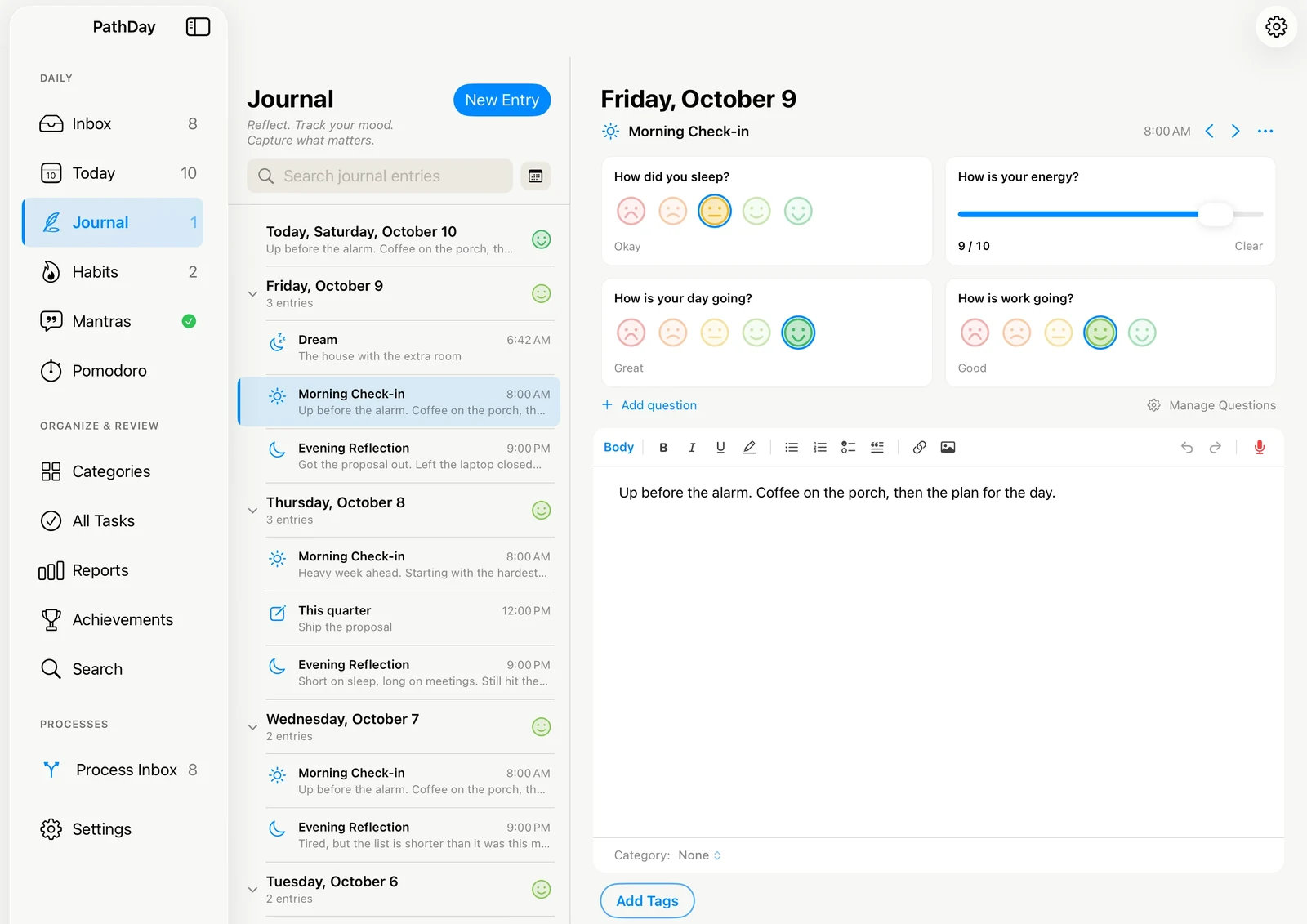
A page for every day
Today is always at the top, with every day you wrote below it. Write one entry a day, or a few check-ins.
Check-ins on your schedule
Once Daily, Morning and Evening, three a day, or your own, with a count of what is still unwritten.
Questions you write
Answer with five faces or a 1 to 10 scale. Show a question on certain check-ins or certain days.
Rich text and photos
Headings, lists, checklists, quotes, and photos, right in the entry. It saves as you write.
Talk instead of type
Record a voice entry and keep it, or have PathDay turn it into text in the page.
Shared with your tasks
Entries take the same categories and #hashtags as your tasks, with a calendar and search to find any day.
Dream Journal
Optional, with its own questions. Turn it on in Journal Settings.
Your day, without your phone
A full PathDay app on Apple Watch rather than a remote control for your phone. It opens on Today and carries Previous Days, Ongoing, Habits, and Mantras with it.
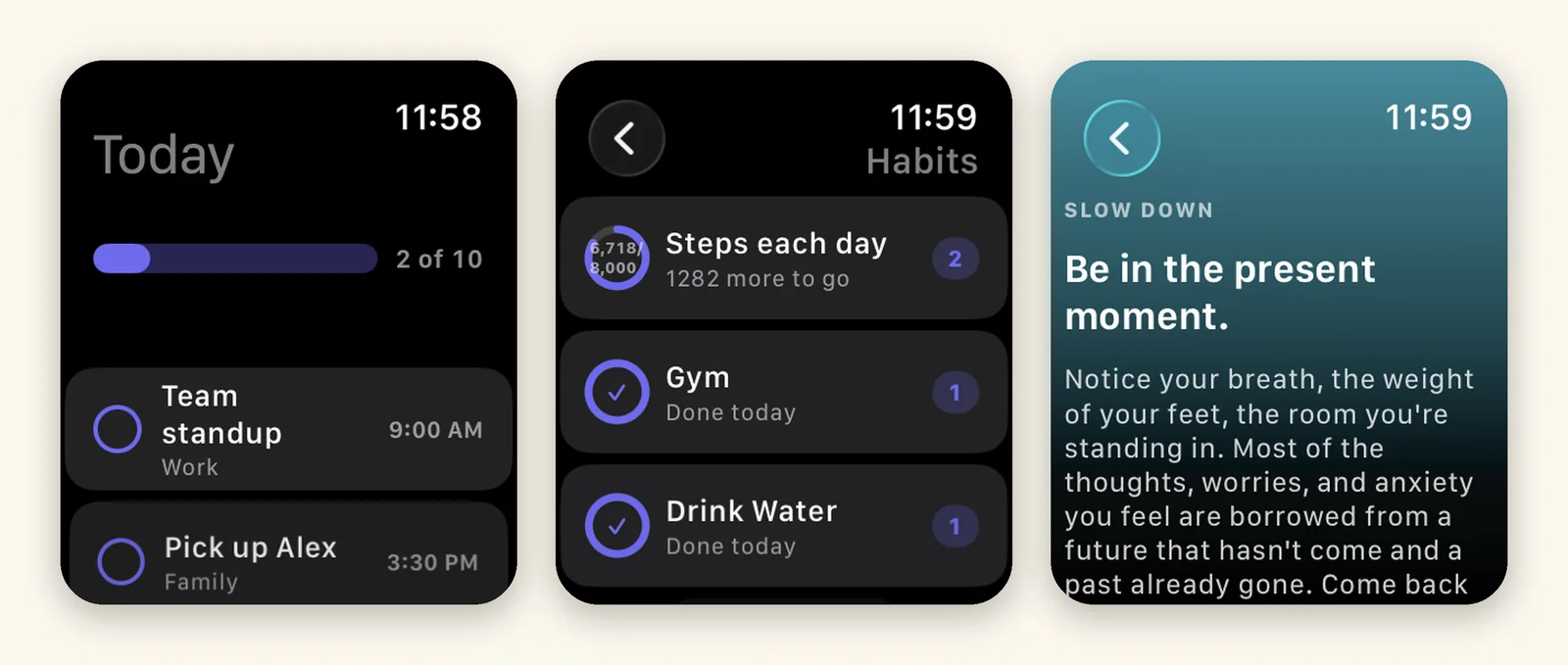
Opens on Today
The day’s progress across the top, then what is scheduled, each task with its time and its category.
Check off from your wrist
Complete a task or log a habit on the watch. Finished items stay struck through where you left them.
Habits with their progress
Rings and counts showing how far along you are and how much is left, not just whether you have started.
Mantras in full
Read the whole mantra on the watch instead of a truncated preview, and mark it read there.
Your day, without opening the app
Today, Habits, and Mantras each get their own widget, on the iPhone and iPad Home Screen and on the Mac desktop.
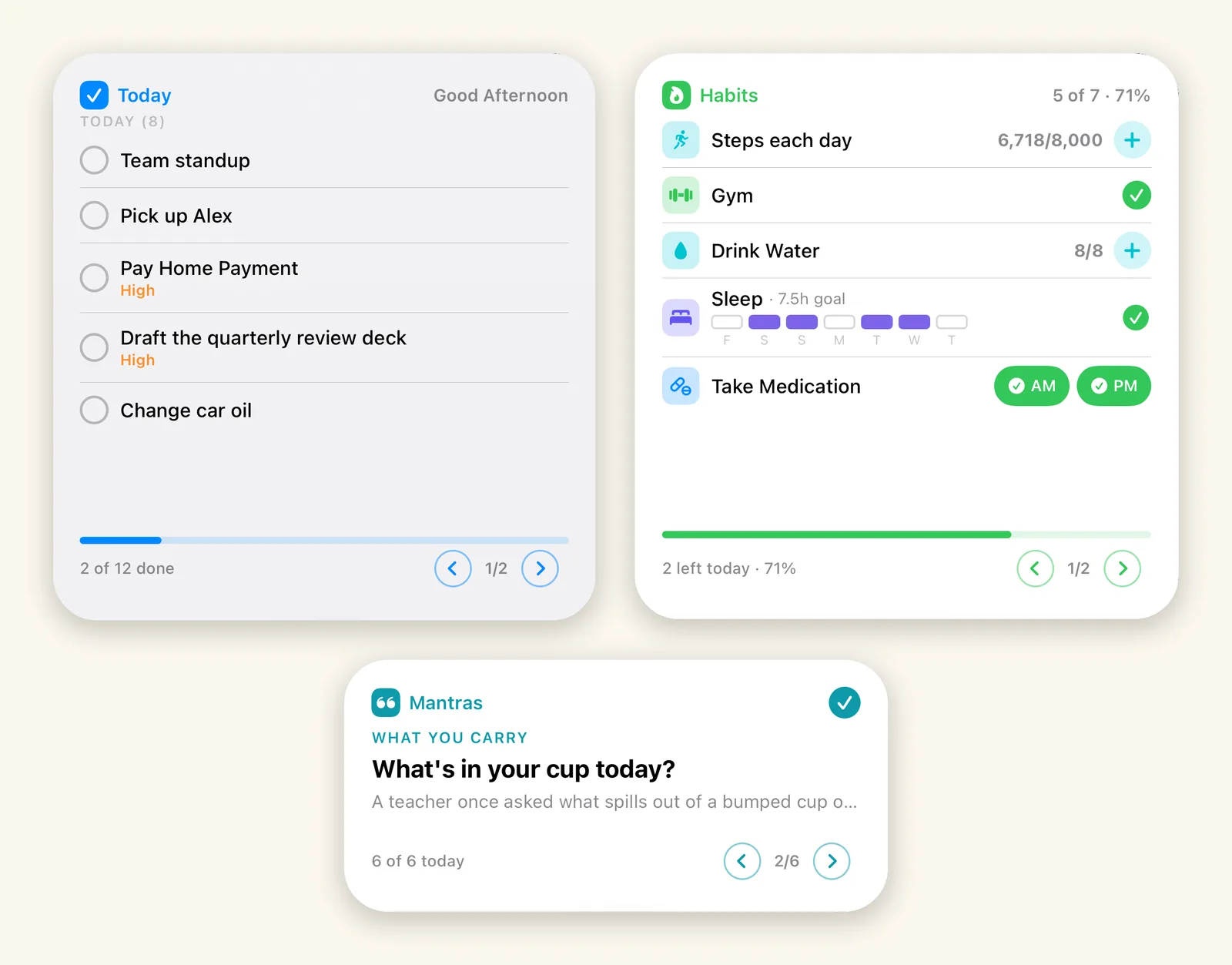
Three widgets, three sizes
Today, Habits, and Mantras, each available in small, medium, and large.
Mac desktop too
The same three widgets on your Mac desktop, reading the same synced data.
One tap to act
Check off a task, log a habit, or mark a mantra read straight from the widget without opening the app.
Page through the day
Arrows move through whatever does not fit, with the day’s progress along the bottom.
See your progress, make it yours
Understand what you actually completed, and shape the app around how you work.
Reports
Daily, Monthly, and Yearly bar charts for Tasks, Habits, and Mantras, with Category and Tag filters.
Search
Find tasks by name or notes, narrowed by status, recurring, Category, and Tag filters.
Achievements
Flag a task as an achievement and collect them by year and month.
Themes
Choose Automatic, Light, or Dark, or one of the color themes, under Settings.
Make it yours
Set defaults for new tasks, choose card styles, and configure your bottom-bar tabs.
Offline and iCloud sync
Works offline, then syncs through your own iCloud across iPhone, iPad, Mac, and Apple Watch.
Storage
See the photos, recordings, and attachments PathDay keeps in iCloud, largest first, and clear what you no longer need.